


Leaderboard
-

Troy
Administrators1Points14,765Posts

Popular Content
Showing content with the highest reputation on 01/21/2017 in Posts
-
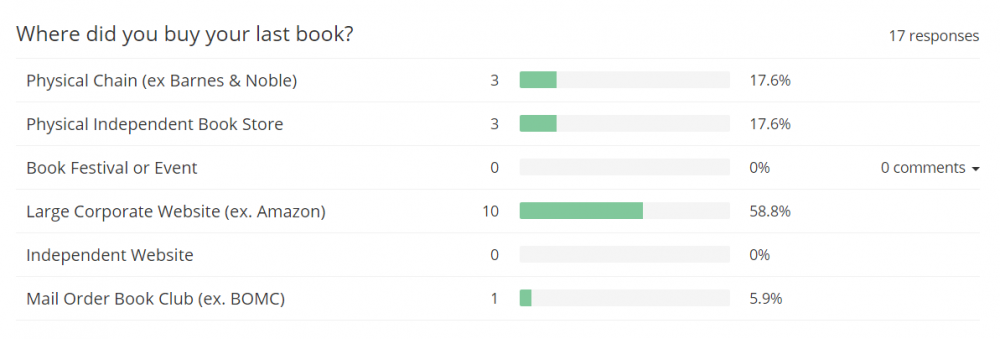
Last night after, writing the post above, I began running a new poll. To ask the question Where did you buy your last book. Of course, the software available to collect this information is far superior to what I used back in 1999. I was able to find and implement a new poll in a matter of minutes. The company I used is called Get Site Control. I never heard of them prior to looking for poll taking tool software. Get Site Control also provide a variety of other widgets for your site or Blog. Creating a feature rich website is much easier than ever before, but we have much less diversity on the web because massive corporate sites dominate. It really is a great loss of creativity, but I digress... Here are the results of the Where did you buy you last book? question thus far: Of course, given Amazon's dominance, I don't expect any relations with this question. The main purpose is to contrast the responses with those given 17 years ago. I also recognize that since this question is posted on this website, that there are inherent biases, so I would not extend these answers to the general population. But given the fact that internet penetration is so much higher today compared to Jan 2000 when the question was first asked. The survey is probably less biased than the one taken 16 years ago. Finally, it will be interesting to see if I get 856 responses and how long it takes.
 1 point
