Skip to content
View in the app

A better way to browse. Learn more.

African American Literature Book Club

A full-screen app on your home screen with push notifications, badges and more.

To install this app on iOS and iPadOS
  1. Tap the Share icon in Safari
  2. Scroll the menu and tap Add to Home Screen.
  3. Tap Add in the top-right corner.
To install this app on Android
  1. Tap the 3-dot menu (⋮) in the top-right corner of the browser.
  2. Tap Add to Home screen or Install app.
  3. Confirm by tapping Install.

An Early Laptop

(0 reviews)

Do you have any computational tech from the 1970s? 2 members have voted

  1. 1. Have you ever considered making your own computer, not just the computational but the physical elements?

    • yes
      100%
      2
    • no
      0%
      0

Please sign in or register to vote in this poll.

3 Comments

Recommended Comments

No, I don’t have any tech from the 70’s there wasn’t much personal tech to speak of back then just a TV, radio, Variety of devices to play music, a calculator, and maybe a digital watch.


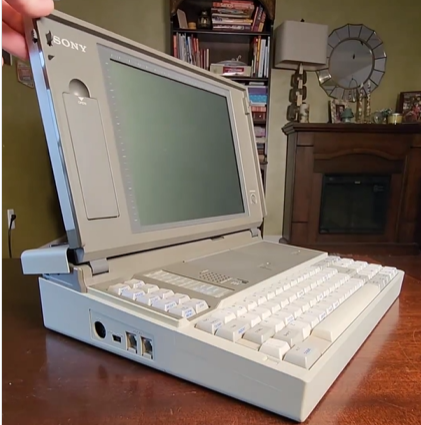
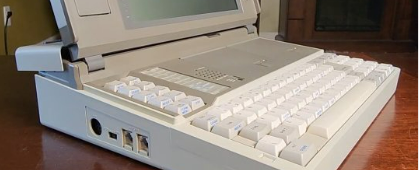
Yeah, that laptop did not have a hard drive. One of the floppy disks held the operating system and other held the program that you were running. 
 

I’m not sure they called that device a laptop back then might’ve been called a portable computer, but I could be wrong. 
 

I did not answer the question because I did not know what you meant between computational and physical elements. Are used to build and sell personal computers back in the early 90s.

richardmurray

Boycott Amazon

@Troy computational elements means programs/code, physical elements means battery/power source/resistors/capacitors/cords/circuit boards and more

Join the conversation

You are posting as a guest. If you have an account, sign in now to post with your account.
Note: Your post will require moderator approval before it will be visible.

Guest
Add a comment...

Account

Navigation

Search

Search

Configure browser push notifications

Chrome (Android)
  1. Tap the lock icon next to the address bar.
  2. Tap Permissions → Notifications.
  3. Adjust your preference.
Chrome (Desktop)
  1. Click the padlock icon in the address bar.
  2. Select Site settings.
  3. Find Notifications and adjust your preference.